DSRest extension
3DEXPERIENCE API extensions (on-prem)
The Dassault Systemes Public service API is rich but still growing. There are cases when data required to build the widget you need is not available trough the public API.
3EXPERIENCE provides a documented framework for on-prem systems to extend the platform with your own services. The DS Rest extension API handles authentication etc and provides a convenient framework for coding your own end points.
Widgetbox includes configurable DS Rest extensions making it much easer to create and maintain high quality performant API without any coding.
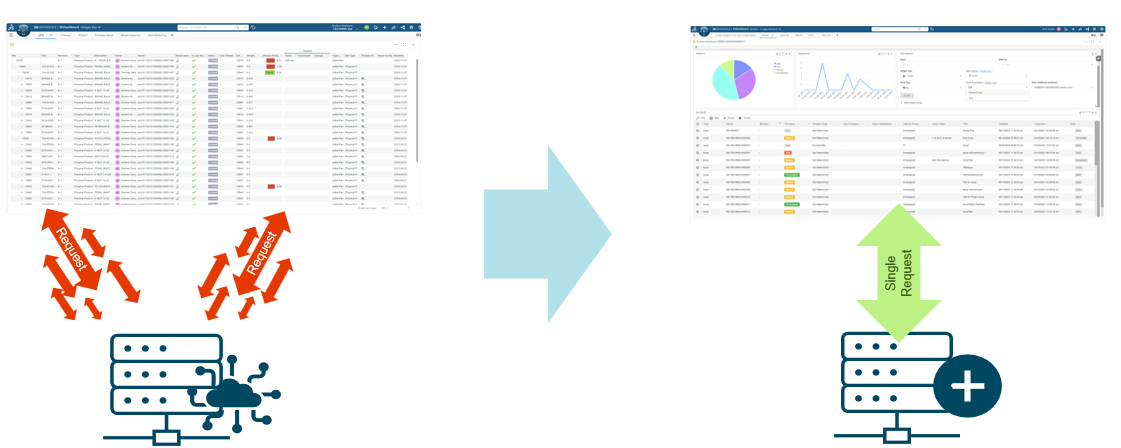
Network performance
For cases when a large number of public API calls is required to get the data a single service can be configured to return all information required in one call. Reducing the number of service calls can have a huge impact on performance. (e.g. 1*250ms vs 100 * 200ms = 2s).
Evaluator performance
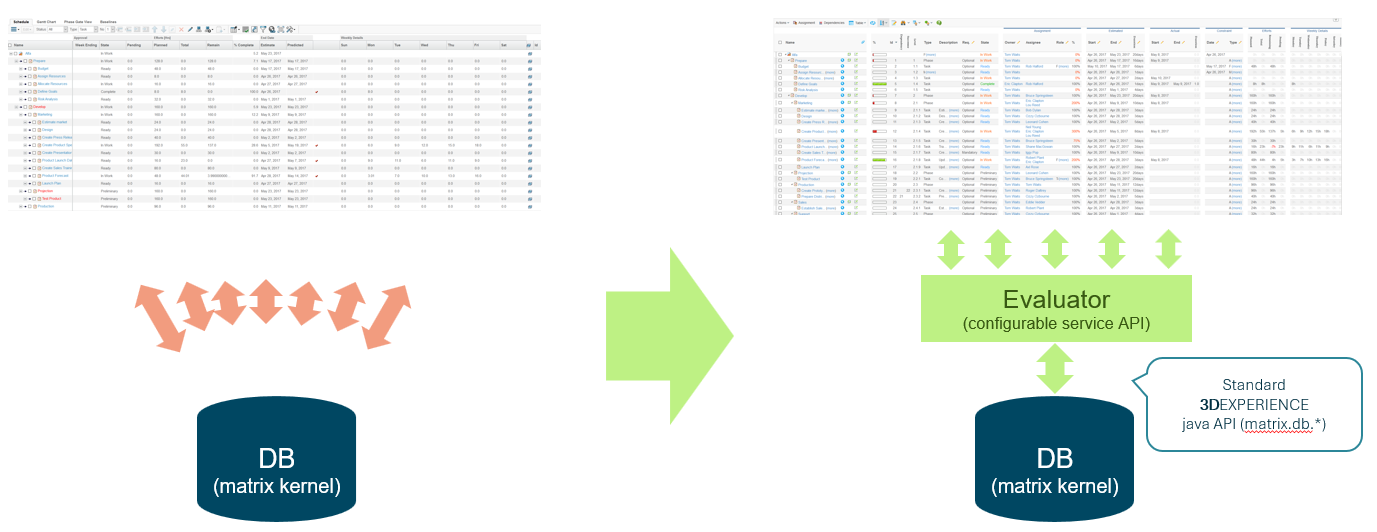
Accessing data directly using the Java API from your custom code is open for mistakes. It is common that developers makes DB calls from within loops as it makes logical sense to loop rows, then loop cells etc to get that particular data. The evaluator concept ensures minimal DB interaction by first collecting information about the required selects before getting all selects for all objects in one go.
API extension configuration
Payload
Service extensions are defined using payload configuration. A payload configuration controls the content of the service response using dataset and table definitions. This is the same payload format TIF uses, refer to the TIF admin guide for in depth payload documentation. The difference compared to a TIF payload is that widget payloads are generated within the DS Rest framework in 3dpace with the logged in user context (instead of a integration system user in a standalone process).
Service payload configurations goes in a payload folder under in WEB-INF/tvc similar to classic and helium configuration e.g. WEB-INF/tvc/DOMAIN/SUBDOMAIN/payload.
<?xml version="1.0"?>
<Payload rootElement="ups-full-data">
  <TableContent outerElement="structure">
    <Table ref="tvc:table:widgetbox/UPSTable.xml"/>
    <DataSet ref="tvc:dataset:widgetbox/UPSFullSet.xml"/>
  </TableContent>
</Payload>
Data set
A dataset defines the objects and relationships that a service should return. There are multiple different data set definitions that can be combined in multiple ways to return quite complex data sets without any coding (e.g. expand full structure over specific relationship, filter out objects of a certain type in release state, return the related tasks). This is the same data set format used by TVC, Helium and TIF. Refer to the TVC admin guide for in depth data set documentation.
<DataSet>
  <Expand>
    <From>true</From>
    <To>false</To>
    <Depth>0</Depth>
      <RelationshipPattern>
        <Relationship>VPMInstance</Relationship>
        <Relationship>SpecificationDocument</Relationship>
        <Relationship>Contributes To</Relationship>
    </RelationshipPattern>
  </Expand>
</DataSet>
Table
A table is used to define the data to be selected and returned. This is the same table format used by TVC Classic, Helium and TIF. Refer to the TVC admin guide for in depth table documentation.
<Table>
  <Column>
    <Name>name</Name>
    <Expression>name</Expression>
  </Column>
  <Column>
    <Name>oid</Name>
    <Expression>physicalid</Expression>
  </Column>
  <Column>
    <Name>ChangeRequest</Name>
    <Expression>to[Candidate Affected Item].from.name</Expression>
  </Column>
  <Column usesBusinessObject="false">
    <Name>rid</Name>
    <Expression>physicalid</Expression>
  </Column>
  <Column>
    <Name>title</Name>
    <Expression>attribute[PLMEntity.V_Name].value</Expression>
  </Column>
</Table>
Calling a service extension
Service extensions are called by providing your conf key as a request parameter to the /resources/WidgetBox/Services/Data URI.
Note that the conf key for the configuration file WEB-INF/tvc/DOMAIN/SUBDOMAIN/payload/MyPayload.xml would be tvc:payload:DOMAIN/SUBDOMAIN/MyPayload.xml.
The transformer widgetBoxServicePayload for parsing API extension payloads is included.
Example configuration
{
  "name": "upsService",
  "uri": "/resources/WidgetBox/Services/Data?conf=tvc:payload:widgetbox/UPSFullData.xml&id={{contextId}}",
  "transformer": "widgetBoxServicePayload"
}